
Why is my Wi-Fi slow at home? A Newcastle troubleshooting guide
Quick answer
Slow Wi-Fi at home is rarely one problem — it's usually a stack of small ones. Router in the wrong spot, one older device dragging the whole network down, a single dead zone at the back of the house, or an internal cable that hasn't performed well since the last renovation. This guide walks through the questions we ask Newcastle homeowners before we book a site visit, so you can rule out the easy stuff first.
1. Is it your internet or your Wi-Fi?
These are two different things, and confusing them wastes time.
- Your internet is the connection coming into the house — NBN (FTTP, FTTN, FTTB, HFC), fixed wireless, Starlink or another carrier. The speed of that connection is limited by your plan and the technology at your address.
- Your Wi-Fi is how the router broadcasts that connection inside the house. Wi-Fi speed drops with distance, thick walls, interference and the number of connected devices.
The fastest way to separate the two: plug a laptop into the router with an Ethernet cable, then run a speed test at speedtest.net or fast.com. If wired speeds are close to your plan and Wi-Fi is slow, it's a Wi-Fi coverage / hardware problem. If wired speeds are also poor, it's more likely an ISP or NBN issue.
2. Where is your router — really?
The single biggest cause of slow Wi-Fi in Newcastle homes is router placement. Most ISPs install the router wherever the NBN NTD landed — often inside a garage, a laundry cupboard or a corner room. Wi-Fi radiates in every direction from the router, so anything on one side of it is essentially unreachable.
Rules of thumb we use on site:
- Router should sit centrally in the living area of the house, not against an outside wall.
- Elevated (on a shelf) is almost always better than sitting on the floor.
- Metal cabinets, mirrors, TV cabinets and appliances all absorb Wi-Fi signal.
- If moving the router is hard, run a Cat6 cable from the NTD to a better location and reposition it. This is what a data cabler does.
3. Wi-Fi dead zones and the great back-room mystery
Newcastle brick-veneer homes with concrete-slab construction eat Wi-Fi for breakfast. If you have one room where Wi-Fi is unusable, a single router usually can't fix it. Options in order of cost:
- Move the router (free — but often blocked by NBN cable location).
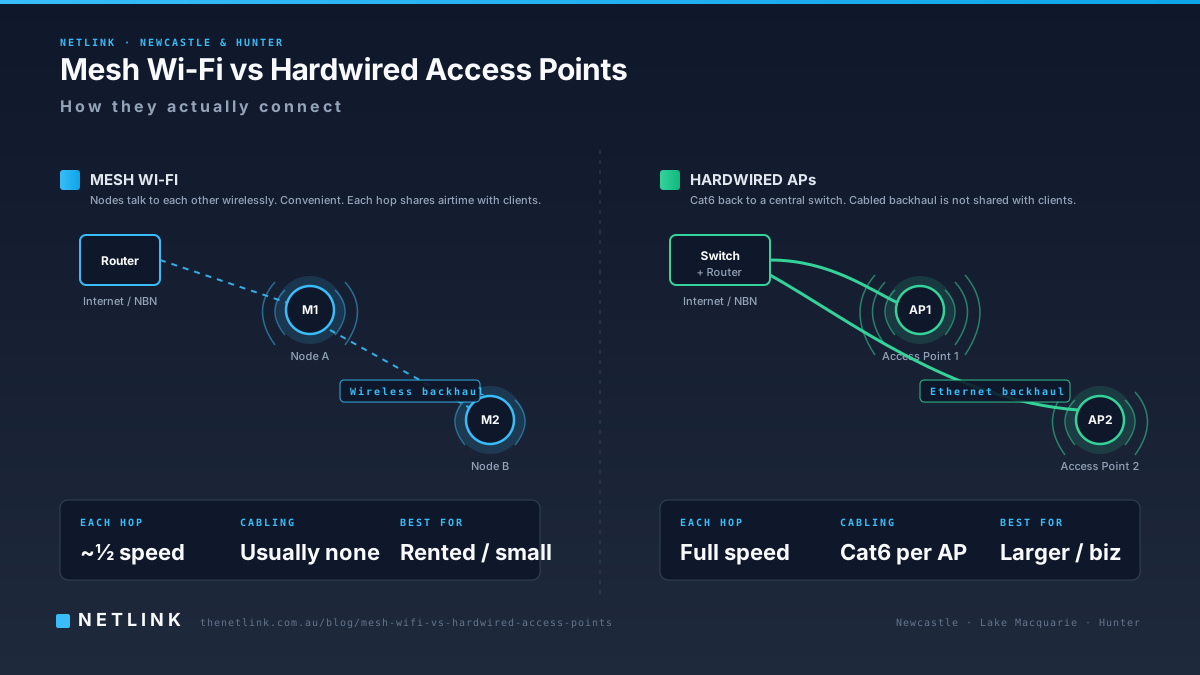
- Add a hardwired Wi-Fi access point at the far end of the house (Cat6 back to the router, cleanest fix).
- Add a mesh Wi-Fi system with Ethernet backhaul between the mesh nodes (also cleanest fix when Cat6 is possible).
- Add a mesh Wi-Fi system with wireless backhaul (works but slower — each hop halves the speed).
- Add a Wi-Fi range extender (last resort — usually creates new problems).
For most Newcastle and Hunter homes we recommend the second or third option. If you'd like us to survey the home and quote it, book a Wi-Fi & Internet Assessment — we'll map the coverage, test the speeds room by room and give you a written recommendation.
4. Old cabling in the walls
Older homes across Merewether, Hamilton, Cardiff and inner Newcastle often still have legacy telephone cabling in the walls. On FTTN NBN connections, unused telephone extensions can literally drag down the connection speed via what's called a 'bridge tap' — the extra copper wire sitting in the wall causes electrical noise that reduces the usable bandwidth.
Rationalising the internal socket setup — sometimes as simple as disconnecting an unused extension in the garage — can improve an FTTN service noticeably. That work is part of our NBN wiring service.
5. How many devices are you actually running?
A typical Newcastle family home in 2026 has: 4 phones, 2 laptops, 2 smart TVs, a Nintendo Switch, a video doorbell, 4 smart plugs, 3 Alexa speakers, a robot vacuum, 2 wireless printers and a smart fridge. That's 20+ devices sharing the router.
Most ISP-supplied routers handle 20-30 devices fine on the 5GHz band. Older routers, or routers stuck on the 2.4GHz band, hit a ceiling long before that. If you've never upgraded the router your ISP gave you five years ago, it's part of the problem.
6. When the fault really IS your internet provider
Sometimes the internet really is broken. Signs we look for:
- Wired speeds far below the plan for multiple days running.
- Regular dropouts at the same time of day (evening peak often means NBN Co has under-provisioned bandwidth to your ISP).
- Connection drops for 30-60 seconds and comes back — usually a network-side issue.
- Router logs show frequent 'PPP' or 'PPPoE' re-authentications.
If your wired testing points at the ISP, we write up the findings so you can escalate. Netlink doesn't own or repair the NBN network, but documented evidence makes a fault ticket move much faster.
7. What we actually do on a Wi-Fi & Internet Assessment
Depending on your symptoms and connection type:
- Wired vs Wi-Fi speed comparison in multiple rooms
- Signal-strength map of the property
- Router placement and antenna orientation review
- Ethernet outlet testing (are the outlets in the walls still good?)
- NTD-to-router cable check
- Internal socket audit for applicable FTTN services
- Rack or patch-panel check on multi-outlet homes
- Written findings — whether the fix sits with us, your IT provider or your ISP
Ready to have someone look at it?
We service Newcastle, Lake Macquarie, Maitland, Cessnock, Port Stephens and the wider Hunter Region. Book a Wi-Fi & Internet Assessment or call 1300 890 470 and describe the main symptom.
Book a home visit before install day so your router ends up where you actually need it.
Questions from Newcastle & Hunter businesses
Is slow Wi-Fi always the internet provider's fault?
No. Poor Wi-Fi in one room, buffering on the smart TV or Zoom dropping mid-call are usually caused by things inside your home — router placement, Wi-Fi coverage gaps, older internal cabling or an overloaded home network. The internet plan is only one factor.
How can I tell whether the problem is my internet or my Wi-Fi?
Plug a laptop into the router with an Ethernet cable and re-run a speed test. If wired speeds are close to your plan but Wi-Fi is much slower, the problem is Wi-Fi coverage inside the house. If wired speeds are also poor, the problem is more likely at the ISP or NBN network.
Do I need mesh Wi-Fi?
Not always. For smaller homes a well-placed single router is often enough. Mesh Wi-Fi helps larger properties or homes with thick walls — but only if the mesh nodes are connected back with Ethernet cable ('backhaul'). Mesh without backhaul is not a magic fix.
Can Netlink fix my Wi-Fi problems?
Netlink diagnoses customer-side cabling, router placement and Wi-Fi coverage across Newcastle and the Hunter. If testing shows the fault sits with your internet provider or NBN, we document the findings so you can escalate. See the Wi-Fi & Internet Troubleshooting service page for details.
How much does a Wi-Fi assessment cost?
Prices depend on the property size, connection type and any cabling work required. Send us the address, connection type and main symptom and we'll come back with a written scope.