
Mesh Wi-Fi vs Hardwired Access Points: Which Is Better?
Direct answer
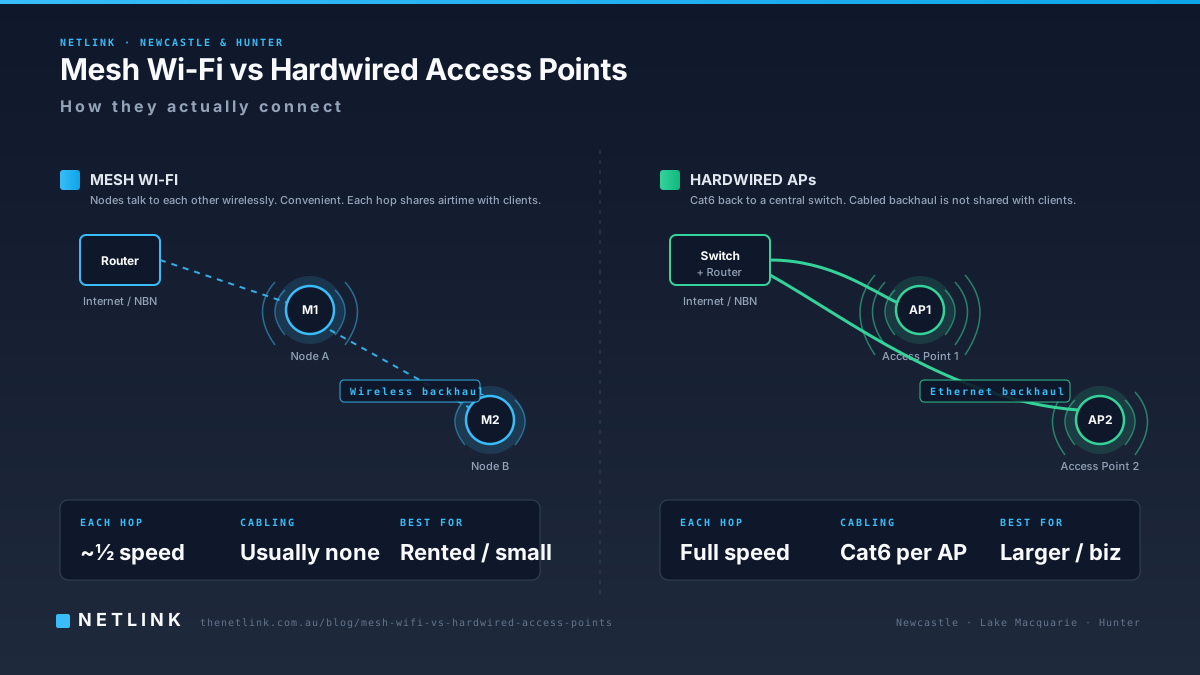
Mesh Wi-Fi can be a practical option where new cabling is difficult, while access points connected by Ethernet generally provide more predictable performance for larger homes, offices and high-demand areas. The correct choice depends on the building construction, coverage area, device count, cable access, internet speed and budget. This guide compares both approaches from the perspective of a Newcastle-based cabling installer so you can make an informed decision before purchasing equipment.
Comparison at a glance
| Mesh Wi-Fi (wireless backhaul) | Hardwired access points (Ethernet backhaul) | |
|---|---|---|
| Connection between nodes | Wireless between mesh nodes | Ethernet cable back to a switch or router |
| Performance consistency | Can be affected by walls and interference between nodes | More predictable — cabled link is not shared with client Wi-Fi |
| Installation complexity | Low — plug in and configure | Higher — cable runs, terminations, possibly ceiling access |
| Cabling required | Typically none between nodes | Cat6 (or Cat6A) from each access point back to a rack or switch |
| Suitability for multiple storeys | Workable if nodes are well positioned; a wired uplink between floors improves reliability | Strong — one access point per floor is a common approach |
| Suitability for thick walls / metal | Limited — signal between nodes weakens | Strong — cable is not affected by wall construction |
| Business suitability | Useful for very small offices; less flexible at scale | Preferred approach for most offices, shops and warehouses |
| Roaming between areas | Generally handled by the mesh vendor's software | Handled by the access-point vendor's controller; can support VLANs, guest SSIDs, PoE |
| Scalability | Adding more nodes may reduce shared wireless capacity | Scales cleanly by adding more cabled access points |
| Maintenance | Firmware updates via app; occasional reboots | Firmware updates via controller; cabled infrastructure is stable |
| Cost factors | Hardware cost; usually no cabling cost | Hardware cost + cabling installation cost |
| Best use cases | Rented homes, difficult-to-cable properties, coverage-only goals | Larger homes, offices, high-device-count sites, long-term installations |
What is mesh Wi-Fi?
A mesh Wi-Fi system is a set of two or more wireless nodes that co-operate to broadcast a single network across a larger area than one router alone. The nodes talk to each other wirelessly (or via Ethernet where possible) and hand off connected devices as they move around the property. Popular consumer examples include TP-Link Deco, Netgear Orbi, Google Nest Wifi and eero. Business-grade mesh products also exist.
What is a hardwired access point?
A hardwired access point (AP) is a dedicated wireless radio mounted on a wall or ceiling and connected by Ethernet cable back to a switch or router. Common examples include Ubiquiti UniFi, TP-Link Omada, Aruba Instant On and Cisco Meraki. Each AP handles Wi-Fi for its local area, while the cabling handles the connection back to the network — free from wireless interference.
Wireless mesh backhaul vs Ethernet backhaul
'Backhaul' means how a Wi-Fi node moves data back to the internet connection. Wireless backhaul is convenient but shares the same radio spectrum that client devices use — every hop between nodes typically reduces available bandwidth. Ethernet backhaul carries data on a dedicated cable, so the wireless radio is available for client devices only. In practice, wired backhaul is more reliable for larger homes and any commercial setting.
- Wireless backhaul: simplest to install; performance drops with each additional hop.
- Ethernet backhaul: more consistent performance; requires Cat6 (or Cat6A) between mesh nodes or APs.
Performance and reliability
For a small single-storey home or a compact office where a single router already provides adequate coverage, either approach can work well. In larger, older or multi-storey properties, hardwired access points typically produce more consistent throughput, lower latency for video calls, and fewer complaints from users about roaming between rooms.
In our field experience across Newcastle and the Hunter, complaints about mesh Wi-Fi performance almost always come from properties where the nodes had to sit far apart with limited wireless line-of-sight — often through several brick or plasterboard walls. Adding a single Cat6 backhaul cable between the two most-used nodes usually eliminates the complaint.
Multiple-storey homes
Two-storey Newcastle homes with concrete-slab construction are a common challenge. Signal loss between floors can be significant. Options that generally work well:
- One hardwired access point on each floor, connected by Cat6 back to the router or switch.
- A mesh system where each node is connected by Ethernet backhaul between floors.
- A single well-positioned router at the top of the ground-floor staircase, if coverage is only marginally poor upstairs.
Offices, shops and warehouses
For most commercial premises, ceiling-mounted access points on Cat6 (or Cat6A) cabling are the more scalable option. Benefits include:
- Separate guest and staff SSIDs on the same hardware.
- PoE (Power over Ethernet) — one cable delivers data and power to the access point.
- Central management via a controller (cloud or on-site).
- Predictable performance in higher-density device environments — retail POS, warehouse scanners, VoIP handsets.
Commercial cabling for access points, comms racks and patch panels is available through our commercial data cabling service.
Thick walls and metal structures
Netlink installs Wi-Fi across a range of Newcastle and Hunter properties, from double-brick heritage homes in the inner suburbs to steel-clad warehouses along the M1 corridor. Both construction styles absorb or reflect Wi-Fi signal. Wireless mesh backhaul often struggles in these environments, whereas Ethernet-fed access points continue to perform because the cable does not care about wall material.
Device count and congestion
In 2026 an average Newcastle family home has 20-30 connected devices, and a modest small business easily reaches 40-60. Consumer mesh systems are typically rated for 30-60 devices per node in ideal conditions, and this drops in real-world use. Enterprise-grade access points handle higher device counts and provide better airtime fairness — a technical way of saying that no single slow device drags the whole network down.
When repositioning the existing router may be sufficient
Not every Wi-Fi problem needs new equipment. Before spending money on mesh or access points, consider whether the existing router simply needs to move:
- Is the router currently inside a garage, laundry cupboard or metal cabinet?
- Is it against an outside wall, with the property mostly on one side of it?
- Is it sitting on the floor, or behind a TV or appliance?
- Would a single Cat6 cable let it move to a central location?
If any of these are true, a router relocation is usually the cheapest and highest-impact upgrade you can make.
When Cat6 cabling is worthwhile
Investing in permanent Cat6 cabling is generally worthwhile when: the property is expected to stay in service for many years; multiple access points are needed; PoE-powered devices are involved (cameras, doorbells, voice handsets, access points); or the network is business-critical. Netlink's residential data cabling and commercial cabling teams can assess feasibility and quote in writing.
Hybrid options
A property does not have to choose one or the other. A common hybrid we install:
- One hardwired access point at the busiest end of the house or office — Cat6 back to the rack or router.
- A mesh node covering the smaller secondary area, connected wirelessly or via Ethernet backhaul.
- One SSID across both so devices roam seamlessly.
This approach balances performance where it matters with lower installation cost in less critical areas.
Planning access-point positions
Where you place an access point affects performance more than which brand you buy. General principles:
- Ceiling mounts perform better than shelf placements for most access points.
- One access point per 60-90 square metres in a typical home; more in dense commercial fit-outs.
- Avoid mounting directly next to metal ducts, water heaters or steel beams.
- Keep clear line-of-sight to the areas you need to cover — walls at 90 degrees are the biggest obstruction.
- Where two access points are used, place them so their coverage overlaps by roughly 15-20% for smooth roaming.
Questions to ask before buying equipment
- Is Ethernet cabling available (or achievable) at the intended AP locations?
- How many devices need to connect at peak times?
- Are there PoE devices (cameras, phones, access points) that would benefit from cabled power?
- Is the internet plan itself fast enough to justify the upgrade — or is the ISP the real bottleneck?
- Who will manage the network long-term — the owner, the customer's IT provider, or someone else?
When Netlink may help
Netlink diagnoses customer-side cabling, router placement and Wi-Fi coverage across Newcastle and the Hunter Region. A Wi-Fi & Internet Performance Assessment tests the property, maps the coverage and explains whether the fix sits with new cabling, better hardware placement, additional access points, or your internet provider. We do not sell one solution as suitable for every property — the recommendation depends on what the testing reveals.
Related reading
See our companion guide: Why is my Wi-Fi slow at home? A Newcastle troubleshooting guide.
Book a home visit before install day so your router ends up where you actually need it.
Questions from Newcastle & Hunter businesses
Is mesh Wi-Fi better than a hardwired access point?
Neither is universally better. Hardwired access points connected by Ethernet generally offer more predictable performance and are typically the stronger choice in larger homes, offices and high-demand areas. Mesh Wi-Fi is often practical where new cabling is difficult and coverage is the primary concern. The correct answer depends on the building, coverage area, device count and budget.
Does mesh Wi-Fi need Ethernet cables?
Not strictly — mesh systems can connect wirelessly between nodes. Performance is more consistent when the nodes are connected by Ethernet ('wired backhaul'). If Ethernet is available or can be added easily, it usually improves the system substantially.
Will mesh Wi-Fi cover a double-storey brick house?
It depends on the construction. Two nodes may be sufficient for a smaller home. Larger double-storey brick or concrete homes may need three or more nodes, and Ethernet backhaul between nodes is usually recommended for reliability.
Are access points better for business Wi-Fi?
For most offices, shops and warehouses, ceiling-mounted access points on Cat6 cabling are the more scalable and predictable option — particularly where multiple SSIDs, guest networks or high device counts are involved.
Can I combine mesh Wi-Fi with hardwired access points?
Yes. Some properties benefit from a hybrid approach — for example, a main hardwired access point covering the primary living or workspace, and a mesh node handling a smaller secondary area. A site survey is the reliable way to design this.
How much does it cost to install hardwired access points?
Costs depend on the number of access points, the cable runs required, wall or ceiling access and the hardware selected. Netlink provides written scopes and quotations after a site assessment rather than fixed prices.