
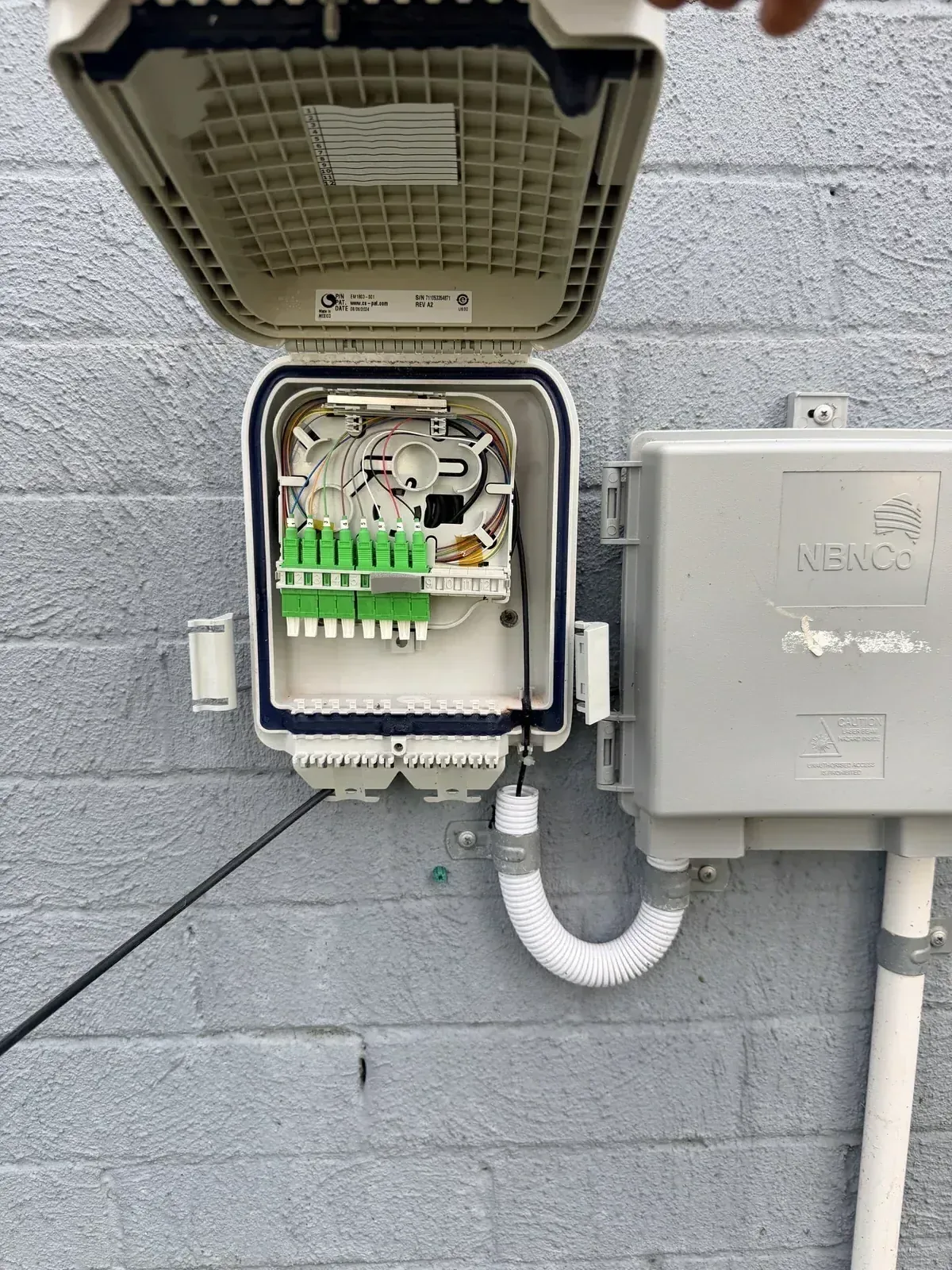
Fibre Optic Cabling and Fibre Splicing in Newcastle
Netlink provides residential and commercial fibre optic cabling, fusion splicing, termination, testing and fault-finding across Newcastle and the Hunter. We install and repair single-mode and multimode fibre for homes, detached buildings, offices, warehouses, communications rooms and private inter-building networks.
Whether you need fibre installed between a house and granny flat, a commercial fibre backbone completed, an existing cable terminated or a damaged link investigated, we can assess the pathway, fibre type, network equipment and testing requirements before recommending a suitable solution.
Residential Fibre Solutions
Home fibre for connections between separate buildings, long private cable routes, home communications cabinets and privately owned fibre repair.
- House-to-granny-flat connections
- Garages, sheds and workshops
- Detached home offices
- Large residential properties
- Rural and semi-rural properties
- Private inter-building network links
- Home communications cabinets
- Existing private fibre testing and repair
- New-build fibre pathway planning
- Long cable routes where copper may not be suitable
Commercial Fibre Solutions
Commercial fibre backbones, MDF-to-IDF links, multi-building networks, industrial sites, CCTV and access-control network backbones with testing and documentation.
- Fibre backbone installation
- MDF-to-IDF fibre links
- Office and warehouse networks
- Communications-room connections
- Multi-building and campus networks
- Factory and industrial sites
- Commercial fit-outs
- CCTV and access-control network backbones
- Server and network-switch connections
- Existing fibre extensions and relocations
- Fibre testing and documentation
- Planned business outage work
Fusion splicing, termination and full test documentation.
Netlink's fibre work covers everything from single-splice repairs to complete backbone installs — with honest testing and clear handover records.
OTDR testing and test reports are available where required. OTDR testing alone should not be described as complete fibre-link certification — formal certification is scoped separately.
- Fibre optic cable installation
- Single-mode (OS2) fibre installation
- Multimode (OM3 / OM4) fibre installation
- Fusion splicing
- Fibre pigtail splicing
- Fibre termination
- LC and SC connections
- FOBOT installation and termination
- Optical distribution frame termination
- Splice-tray preparation
- Fibre patch-panel termination
- Rack and communications-cabinet fibre connections
- Inter-building fibre links
- Fibre backbone installation
- OTDR testing
- Optical-loss (light-source / power-meter) testing
- Fibre continuity testing
- Fibre identification
- Fibre fault location
- Damaged fibre repair
- Re-splicing of customer-owned fibre
- Existing fibre inspection
- Connector inspection and cleaning
- Pathway and conduit planning
- Endpoint labelling
- Test reports and handover documentation where included
Residential fibre optic cabling
Fibre is not required for every residential network. Cat6 or Cat6A may be more economical for ordinary room-to-room connections. Fibre becomes particularly useful for longer distances, links between separate buildings, electrical isolation and higher-capacity backbone connections.
Common residential fibre applications include:
- Connecting a house to a granny flat
- Connecting a detached garage or workshop
- Extending a network to a detached home office
- Large residential blocks
- Rural and semi-rural properties
- Longer private cable routes
- Links between separate buildings
- Locations affected by electrical interference
- Fibre connections to a home communications cabinet
- Repairing privately owned fibre
- Installing pathways during construction or renovation
- Supporting suitable switches, transceivers or media converters
Fibre does not carry Power over Ethernet. Equipment at the remote building will therefore need a suitable local power supply. A residential internet service cannot automatically be shared with a separately addressed or independently occupied property — customers may need to check their provider's terms and other applicable requirements.
For structured cabling inside each building, see residential data cabling.
Commercial fibre optic cabling
Fibre sits at the core of most modern commercial networks — carrying the backbone traffic between racks, floors and buildings while copper handles the last leg to each device. Netlink installs, terminates, tests and repairs commercial fibre across the Hunter, from single-building offices to multi-building industrial sites.
- Office fibre backbones
- Warehouse fibre links
- MDF-to-IDF connections
- Floor-distributor links
- Communications-room connections
- Multi-building networks
- Factory and industrial environments
- Commercial fit-outs
- Server-room and equipment-room links
- CCTV network backbones
- Access-control network backbones
- Network expansions and upgrades
- Existing fibre additions and relocations
- Builder and electrical-contractor support
- Fibre patching and rack termination
- Cable schedules and endpoint labelling
- Testing and reports
- Work requiring planned business outages
- Regional commercial and industrial projects
For end-to-end commercial cabling — racks, switches, patch panels, structured Cat6A and Wi-Fi access points — see commercial cabling.
What is the difference between fibre installation, splicing and termination?
Fibre installation
Installing fibre cable through an agreed customer-side pathway between the required locations.
Fibre termination
Completing the cable at a suitable enclosure, FOBOT, patch panel or endpoint.
Fusion splicing
Joining individual optical fibres using a fusion splicer — permanent and low-loss.
Fibre testing
Assessing continuity, optical loss or link characteristics using testing appropriate to the agreed scope.
Fault finding
Investigating breaks, excessive loss, poor splices, contamination or damaged sections.
Fibre repair
Re-splicing or replacing affected customer-owned fibre where technically practical.
Single-mode versus multimode fibre
| Fibre type | Common applications | Main consideration |
|---|---|---|
| Single-mode, such as OS2 | Longer links, inter-building connections and network backbones | Requires compatible single-mode optics and equipment |
| Multimode, such as OM3 or OM4 | Shorter network links in suitable commercial environments | Supported distance and speed depend on the fibre category and connected optics |
Fibre selection depends on link distance, required network speed, existing fibre infrastructure, switches and transceivers, connector type, fibre count, cable construction, installation environment, network design, expansion requirements and customer budget.
Single-mode and multimode fibres, connectors and optical modules cannot be mixed without technical assessment.
Fibre versus Cat6 or Cat6A
| Requirement | Copper data cabling | Fibre optic cabling |
|---|---|---|
| Ordinary room outlets | Usually the practical option | Generally unnecessary for standard room outlets |
| Power over Ethernet | Supported with compatible cabling and equipment | Fibre does not carry PoE |
| Longer links | Limited by the applicable copper standard | Suitable for substantially longer links |
| Separate buildings | Requires pathway and electrical considerations | Often preferred for electrical isolation |
| Electrical interference | May be affected in some environments | Immune to electromagnetic interference |
| Network equipment | Uses standard copper Ethernet ports | Requires compatible optical modules, switches or media converters |
| Termination and repair | Uses common structured-cabling equipment | Requires specialised fibre equipment and skills |
The correct choice depends on distance, required bandwidth, building separation, electrical conditions, equipment compatibility, pathway, budget and intended use. Neither fibre nor Cat6/Cat6A should be described as permanently "future-proof".
Fibre testing and documentation
Depending on the scope, we use one or more of the following:
- Visual inspection
- Connector end-face inspection
- Connector cleaning
- Fibre identification
- Continuity testing
- Optical power measurement
- Light-source and power-meter loss testing
- OTDR testing
- Fault distance estimation
- Endpoint labelling
- Test reports where included in the agreed scope
- Handover documentation
Testing is selected according to the fibre link, customer requirements and agreed scope. An OTDR trace can help identify events, loss and fault distance, but OTDR testing alone should not automatically be described as full link certification.
Fibre repairs and fault finding
If you already have fibre installed, Netlink can investigate:
- Cut or damaged fibre
- Excessive optical loss
- Failed or poor-quality splices
- Contaminated connectors
- Damaged pigtails
- Unlabelled fibre
- Incorrect patching
- Damaged enclosures
- Existing fibre requiring termination
- Fibre continuity problems
- Suspected faults along a private link
Repair feasibility depends on fibre ownership, fault location, available cable length, cable condition, access, enclosure space, fibre type, spare cores and pathway condition. Not every damaged cable can be repaired without partial or complete replacement.
How a fibre project runs.
Send us photos, plans, connection-point details and any available fibre information for an initial assessment. A site visit may be required before final pricing. Installation timing depends on cable length, access, pathways, terminations, testing requirements and whether civil or outage coordination is needed.
Fibre project cost factors
Fibre pricing is quoted against the actual project rather than a fixed per-splice rate. Factors include:
- Residential or commercial site
- New installation or existing fibre
- Single-mode or multimode fibre
- Fibre category and cable construction
- Fibre count
- Cable length
- Number of splices
- Number of terminations
- Connector type
- FOBOT, enclosure or patch-panel requirements
- Rack or cabinet requirements
- Roof, ceiling or underfloor access
- Underground conduit
- Trenching or civil work
- Separate-building pathways
- Existing pathway condition
- Fault-location complexity
- Testing requirements
- Reporting requirements
- Site induction requirements
- After-hours work
- Business outage coordination
- Regional travel
Request a tailored fibre cabling quote — we don't publish invented fixed prices or a fixed per-splice rate.
Registered fibre cabling with proper test documentation.
Netlink's services are limited to work that Netlink is authorised to perform. Carrier-owned and NBN-owned infrastructure may require the relevant network provider or an authorised contractor. Relevant completed customer-cabling work is documented in accordance with applicable cabling requirements.
Illustrative examples of the kind of fibre work Netlink completes
The following are illustrative examples of the types of jobs Netlink handles. They are anonymised representative scopes — general area only, no customer names, no addresses, no measurements and no invented outcomes. Verified project photography and specific details will be added as they become available.
- Requirement:
- Reliable network to a granny flat where Wi-Fi from the main house was unusable
- Solution:
- Single-mode fibre installed via a customer-installed underground conduit, with a small local switch and Wi-Fi access point at the flat
- Termination:
- LC pigtails fusion-spliced into a small wall-mounted FOBOT at each building
- Testing:
- Visual inspection, connector cleaning and light-source / power-meter optical-loss test on both fibres
- Outcome:
- Local network extended to the flat; Wi-Fi coverage restored at the second building using a wired access point
- Requirement:
- Fibre backbone between the ground-floor comms room and a first-floor IDF for a new office fit-out
- Solution:
- Multimode OM4 fibre run through the existing ceiling and riser pathway
- Termination:
- LC duplex terminations into rack-mount patch panels at both ends, with cable schedules and endpoint labelling
- Testing:
- OTDR trace on each fibre plus bi-directional optical-loss test; test reports supplied at handover
- Outcome:
- IDF connected to the ground-floor rack for the tenancy's structured cabling
- Requirement:
- Reliable network between the office and the workshop across a shared yard with heavy machinery running nearby
- Solution:
- Single-mode OS2 fibre installed via existing underground conduit to provide electrical isolation between the two buildings
- Termination:
- LC terminations into wall-mounted FOBOTs at each building, with a media converter at each end
- Testing:
- OTDR trace, optical-loss test and endpoint labelling
- Outcome:
- Office and workshop networks joined without earthing or interference issues from the machinery
- Requirement:
- Suspected fibre fault after excavation work on a private property; provider testing indicated the fault was on the customer side
- Solution:
- OTDR investigation to identify the approximate fault distance, followed by re-excavation of the affected section and a mid-span splice enclosure
- Termination:
- Two fusion splices per affected core in a new splice tray inside a mid-span enclosure
- Testing:
- Pre- and post-repair OTDR traces, insertion-loss test and connector inspection at both endpoints
- Outcome:
- Link restored without a full cable replacement; test results provided as a written report
Illustrative only — these are representative scopes, not testimonials or specific customer records. Verified case studies will replace this section as project details are approved for publication.
Where Netlink completes fibre work
Fibre optic cabling, fusion splicing, termination, OTDR testing and repair across Newcastle, Lake Macquarie, Maitland, Cessnock, Port Stephens, Dungog, Singleton, Muswellbrook and the wider Hunter region. Availability and travel for regional or complex commercial projects may depend on project scope and location.
Book a related service on the same visit
Bridge-tap removal, socket relocation and NTD-to-router cabling.
Cat6 outlets, wired Wi-Fi backhaul and home-office connections.
Fibre cabling & splicing FAQs
What is fibre optic cabling?
Fibre optic cabling carries data as pulses of light along thin strands of glass. It is used where copper cabling is limited by distance, bandwidth or electrical conditions — commercial backbones, links between separate buildings, industrial sites and longer private cable routes.
Do you provide fibre cabling for residential properties?
Yes. Netlink installs residential fibre for connections between a house and granny flat, detached garages, workshops and home offices, and for larger residential properties with long private cable routes. Fibre is not required for every residential network — Cat6 or Cat6A is often more economical for standard room outlets.
Can fibre connect a house to a granny flat, shed or detached garage?
In many cases yes. Fibre supports longer distances than copper, provides electrical isolation between separately powered buildings and is well-suited to underground pathways. The right approach depends on distance, pathway condition and the equipment at each end.
Is fibre better than Cat6 between separate buildings?
Often yes. Copper between separate buildings introduces distance, surge and earthing considerations. Fibre avoids many of those issues, supports longer runs and is immune to electromagnetic interference — but the equipment at each end must support fibre.
What is fusion splicing?
Fusion splicing uses a purpose-built splicer to fuse the ends of two optical fibres together with an electric arc. It produces a permanent, low-loss join and is the standard method for splicing new pigtails and repairing damaged fibre.
What is the difference between fibre splicing and termination?
Splicing joins two fibres together — usually mid-cable or to a pre-terminated pigtail. Termination completes a cable at an enclosure, FOBOT, patch panel or endpoint so equipment can plug in. Most fibre jobs involve both.
What is the difference between single-mode and multimode fibre?
Single-mode (such as OS2) is designed for longer distances and works with single-mode optics. Multimode (such as OM3 or OM4) is used for shorter enterprise runs with lower-cost short-reach optics. The two are not interchangeable — the connected switches or transceivers must match the installed fibre.
Can Netlink terminate fibre that has already been installed?
Yes. We can inspect existing installed fibre, confirm its type and condition, then terminate, splice on pigtails, install a FOBOT or patch panel and test the completed link.
Can you repair a cut or damaged fibre cable?
Often yes. We investigate the cable, locate the fault (typically with an OTDR), then re-splice or replace the affected section where technically practical. Repair feasibility depends on fibre ownership, fault location, available spare cable, pathway access and enclosure space.
What is OTDR testing?
An OTDR (Optical Time-Domain Reflectometer) sends a pulse of light down the fibre and records the reflections, producing a trace that shows the length of the link, splice locations, connector losses and any faults. It is the standard tool for both documenting a link and locating faults.
Does OTDR testing certify a fibre link?
An OTDR trace is a valuable diagnostic and test result, but OTDR testing alone should not automatically be described as full link certification. Formal certification uses a defined test standard, calibrated equipment and stored results — we scope that separately when a project requires it.
Can you install commercial fibre backbones?
Yes. Netlink installs fibre backbones for office and warehouse networks, MDF-to-IDF connections, communications-room links, multi-building campuses, factory and industrial sites, and CCTV or access-control network backbones.
Can you connect communications rooms or network cabinets?
Yes. We terminate fibre into rack-mount patch panels or FOBOTs, complete rack cable management, label endpoints and provide test results as agreed for the project.
Does fibre support Power over Ethernet?
No. Fibre carries data as light, not electrical current. Equipment at the remote end of a fibre link — for example a switch, PoE injector or camera — needs its own local power. A separate power cable or a media converter with a local supply is normally used.
Can Netlink work on NBN-owned fibre?
Netlink provides customer-side fibre cabling. Carrier-owned and NBN-owned infrastructure is generally managed by the relevant network provider or an authorised contractor — we do not alter that infrastructure outside what applicable requirements permit.
What information is needed for a fibre quote?
Send us photos, plans, the two connection points, an approximate route distance and any known fibre details (type, category, core count). If some of these are unknown, we can determine them during the site visit — customers are not expected to answer highly technical questions to book an assessment.
How much does fibre cabling or splicing cost?
Pricing depends on residential vs commercial site, new install vs existing fibre, single-mode vs multimode, fibre category and construction, fibre count, cable length, number of splices and terminations, connector type, enclosure / rack requirements, pathway access, civil work, testing and reporting requirements, site induction and any after-hours or business-outage coordination.
How long does fibre installation take?
Installation timing depends on cable length, access, pathways, terminations, testing requirements and whether civil or outage coordination is needed. Simple splice jobs are often same-visit; larger inter-building or civil work is scheduled to the project.
Which areas does Netlink service?
Newcastle, Lake Macquarie, Maitland, Cessnock, Port Stephens, Dungog, Singleton, Muswellbrook and the wider Hunter region. Availability and travel for regional or complex commercial projects may depend on project scope and location.
Request a tailored fibre cabling quote
Serving Newcastle and the Hunter — residential, commercial and industrial fibre projects.