
Business Wi-Fi Keeps Dropping? A Newcastle Fix-It Guide
Direct answer
Business Wi-Fi that keeps dropping out is almost never one problem — it's a stack of predictable causes: one router trying to cover a whole shop or office, a POS terminal roaming between poor-quality access points, VoIP starved of airtime because the guest network is streaming, or older Cat5 cabling behind the NTD dragging speeds down. This guide is the commercial companion to our Newcastle home Wi-Fi guide and covers the questions we ask when a Hunter business books a site visit.
1. Business Wi-Fi is not just 'more devices'
The instinct is to buy a bigger router. That rarely fixes a business Wi-Fi problem because the underlying issues are different from a home:
- POS terminals and payment devices assume rock-solid Wi-Fi and lose transactions when it wobbles.
- VoIP handsets and softphones fail obviously — customers hear it in the audio quality.
- Guest Wi-Fi shares airtime with staff Wi-Fi unless deliberately separated.
- Warehouse scanners often live at the edge of coverage where consumer gear can't reach.
- Compliance, insurance and audit trails all assume the network works when it's meant to.
2. Signs the problem is your Wi-Fi (not the ISP)
Plug a laptop into the router with an Ethernet cable and re-run a speed test. If wired speeds are close to your business plan while Wi-Fi is much slower, the problem is inside the building. Other Wi-Fi-specific signals:
- One area of the shop, warehouse or office loses signal completely.
- The problem gets worse mid-morning and mid-afternoon (device count).
- A specific staff SSID drops while the guest SSID stays up (or vice versa).
- Wi-Fi calling on iPhones works in some rooms and not others.
- The Wi-Fi 'looks connected' but no data flows for 30-60 seconds at a time.
3. Signs the problem IS your internet provider
Some faults sit outside the business. Signs the wired testing points at the ISP or NBN network:
- Wired speeds far below plan for multiple days running.
- Dropouts at the same time every evening (peak-hour ISP congestion).
- Full connection loss for 60+ seconds — the router loses PPP session.
- Multiple tenants in the same building reporting the same fault window.
In these cases we write up the findings so you can escalate to your provider. See our residential companion post Why is my Wi-Fi slow at home? for the same principles applied to residential connections.
4. Router placement — the free upgrade
The single biggest wasted opportunity we see in Newcastle offices is a business-grade router hidden inside the comms cupboard. Wi-Fi radiates from the router in all directions — anything inside a metal cabinet is essentially unreachable. Rules we apply on site:
- Router (or primary access point) should sit in the busiest work area, not the comms cupboard.
- Elevated (ceiling-mount or high shelf) beats floor placement every time.
- Metal filing cabinets, fridges, coffee machines and safes all absorb Wi-Fi.
- One long Cat6 back to the NTD lets the router sit wherever coverage is best.
5. When one router isn't enough
Most shops and small offices reach the ceiling of a single router at around 15-25 concurrent devices. Warning signs the Wi-Fi is overloaded rather than broken:
- Mid-morning slowdown when everyone arrives.
- Streaming stalls in the break room while EFTPOS still works at the front counter (they're competing).
- Zoom / Teams calls freeze during peak hours but work fine after 6 pm.
- The router runs hot to the touch.
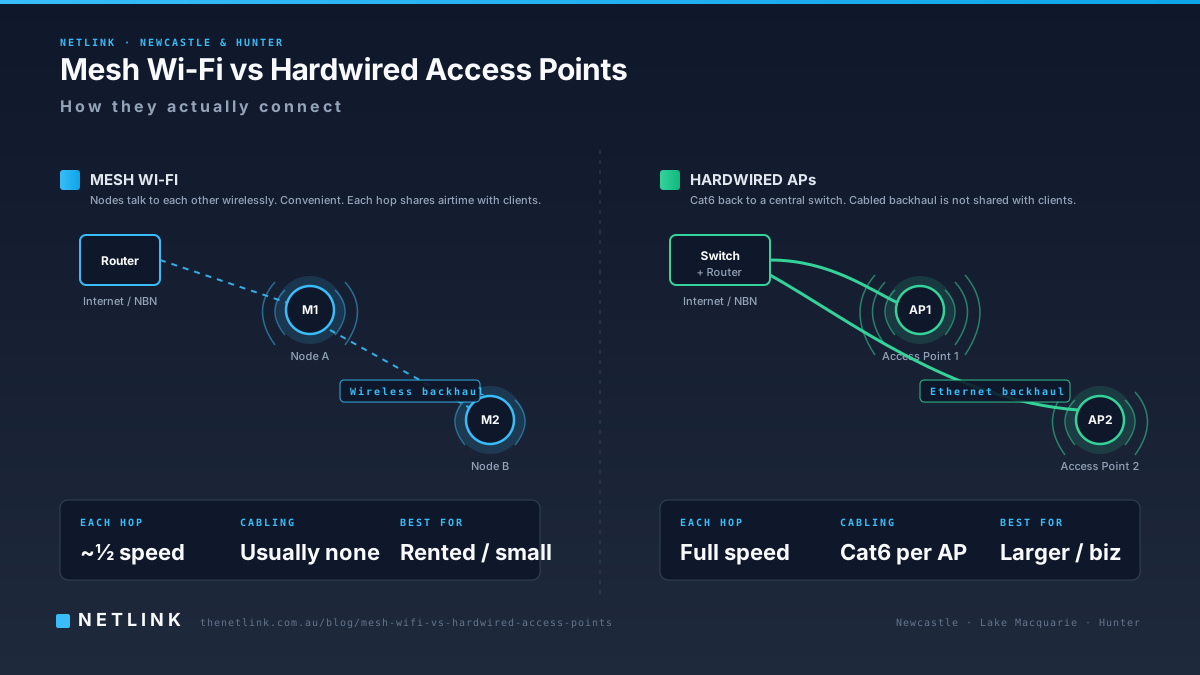
The reliable fix is a hardwired ceiling-mount access point (or two) on Cat6 back to a small switch. Our Mesh Wi-Fi vs Hardwired Access Points comparison covers when each approach makes sense.
6. Guest Wi-Fi is stealing your staff bandwidth
A café serving free Wi-Fi to customers, or a retailer letting shoppers connect, is usually running one flat network — guest devices compete with the POS, the printer and the staff laptops for the same radio. Better setups separate guest traffic:
- Two distinct SSIDs on the same access-point hardware (Guest and Staff).
- Guest SSID limited to internet-only access — no visibility of internal devices.
- Bandwidth cap per guest device so one Netflix session can't clog the pipe.
- Optional splash page for compliance / marketing capture.
Configuration usually sits with the customer's IT provider on top of the cabling and hardware we install.
7. Cabling behind the scenes
Business Wi-Fi complaints often trace back to cabling nobody's looked at in years:
- Older Cat5 or damaged Cat5e between the NTD and the router.
- Access-point cables terminated poorly and failing PoE checks under load.
- A patch panel where several ports look identical but only some actually connect.
- Cables run through metal ducts causing intermittent noise.
Netlink's commercial data cabling service covers Cat6 / Cat6A installation, rack tidy-ups, patch-panel re-terminations and PoE verification — the physical layer that business Wi-Fi depends on.
8. VoIP, Teams and Zoom on business Wi-Fi
Voice traffic is exquisitely sensitive to jitter — even a 40-millisecond glitch is audible. Two reliable ways to make VoIP stable:
- Hardwire the handset with a Cat6 outlet to its desk — no Wi-Fi variability at all.
- Install a dedicated access point close to the primary voice area on Ethernet backhaul so voice packets don't compete for airtime on a shared mesh hop.
9. A short business Wi-Fi audit checklist
Before you spend on new hardware, run through this list — the answers usually tell us which fix is worth quoting.
- How many devices connect during your busiest hour?
- Do all devices need to talk to each other, or is guest / IoT traffic separable?
- Where does your current router or primary access point actually sit?
- When did you last check the cabling behind the NTD?
- Is your Wi-Fi problem repeatable at the same time of day?
- Are wired devices (POS terminals, printers, VoIP handsets) also affected?
- Who manages your network today — an internal person, an MSP, or nobody?
10. When Netlink may help
For Newcastle and Hunter businesses experiencing Wi-Fi dropouts, POS problems or VoIP quality issues, a Wi-Fi & Internet Performance Assessment tests the site, documents where the fault sits and returns a written scope. Any recommended cabling is quoted through our commercial cabling service. We coordinate with the customer's IT provider on hardware and configuration when a boundary needs to be agreed.
Related reading
Homeowners: see the residential companion Why is my Wi-Fi slow at home?. Choosing between mesh and hardwired: Mesh Wi-Fi vs Hardwired Access Points.
Book a home visit before install day so your router ends up where you actually need it.
Questions from Newcastle & Hunter businesses
Why does our office Wi-Fi keep dropping out?
Business Wi-Fi drops for a handful of predictable reasons: one consumer-grade router being asked to cover the whole space, too many devices sharing a single access point, older Cat5 cabling between the NBN NTD and the router, guest devices flooding the staff network, or a genuine ISP fault. The fix depends on which of these is happening — and only wired-vs-wireless testing on site can separate them.
Is a mesh Wi-Fi system enough for our shop or office?
Sometimes. Very small offices (single tenancy, under ~10 devices, no VoIP) can run happily on a good consumer mesh. Once you add POS terminals, VoIP handsets, printers, guest Wi-Fi and 15+ staff devices, hardwired access points on Cat6 are almost always the more reliable answer.
Why does VoIP or Teams sound broken over our Wi-Fi?
Voice traffic is very sensitive to jitter (variable latency). A router juggling 40+ devices, or a mesh node relaying voice packets over a wireless hop, is a common cause. The reliable fix is a hardwired handset, or a Wi-Fi access point close to the desk on Ethernet backhaul.
Our POS keeps going offline for 30 seconds. Is it Wi-Fi or the internet?
Usually Wi-Fi. Short 15-60 second dropouts almost always trace back to the POS terminal roaming between access points, or a single AP rebooting under load. A written assessment will confirm — with wired testing first to rule out the ISP.
Do you replace or supply the routers and access points?
Netlink installs the cabling and mounts access points where required. Hardware choice is often made together with the customer's IT provider — we're happy to work alongside your MSP so the switching, controller and firewall configuration integrate cleanly with the physical install.
What areas do you cover?
Newcastle, Lake Macquarie, Maitland, Cessnock, Port Stephens and the wider Hunter Region. Send us the site address and we'll confirm coverage before booking.